News
New! - DBFView 4.2
February 2, 2011
Fixes:
* Fix with filtering date filelds.
* Some minor fixes.
Download DBFView 4.1
DBFView 4.1
November 15, 2010
New:
* Full compatibility with Windows7.
* DBFView lets you filter dbf files according to specific criteria. Any data not matching the specified criteria is hidden from view. Filtered data, however, can be easily viewed again by removing the filter. Filtering is especially useful in large tables when you need to work only with records meeting your precise criteria.
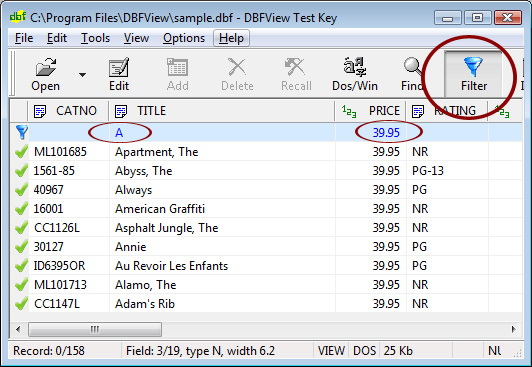
See more info about filtering your table here.
Fixes:
* Some minor fixes.
DBFView 4.0
July 8th, 2010
Fixes:
* The import from XLSX dialog did not appear on some machines.
* Minor fixes.
DBFView 3.9
April 14th, 2010
New:
* Import in memo fields of the existing .dbf file data from XLS, XLSX and CSV files.
DBFView 3.7
November 6th, 2009
New:
* Export DBF files with memo or binary data fields stored in DBT or FPT files to XLS, XLSX and CSV format.
DBFView 3.5
September 19th, 2008
Fixed:
* Import large csv files
* Date conversion with import from csv
DBFView 3.4
August 10th, 2008
Fixed:
* Import from Excel for columns with names more than 8 symbols
* Problem with re-openning bases with memo fields
DBFView 3.3
July 24th, 2008
New:
* The issue appearing while exporting large files in Excel 2007 is fixed!
If your file has more than 65.536 lines it will be split to several sheets (65.536 lines on each sheet).
* Command line support!
Manual of command prompt mode
File options:
[-Iinputfile] input file name, example -Isample.dbf.
[-Oinputfile] output file name, example -Osample.xls.
Convert options:
[-DBFtoXLS] converts dBase file to Excel file.
[-XLStoDBF] converts Excel file to dBase file.
[-XLStoDBF] converts DBase file to CSV file.
Other options:
[-DELIMITER=,] or [-DELIMITER=;] a delimiter for CSV file.
[-HEADERS=0] does not include headers.
[-PROGRES=1] shows progres bar.
Example: DBFView.exe -Isample.dbf -Osample.xls -DBFtoXLS -PROGRES=1
To open file in GUI mode use: DBFView.exe filename.dbf
* Files of all sizes are being sorted now!
Download DBFView 3.3
DBFView 3.2
July 10th, 2008
New:
* Import/export support for Excel 2007!
* Import XLSX files to DBF
* Convert DBF to Excel 2007
Download DBFView 3.2
DBFView 3.01
March 19th, 2007
New:
* Export dbf to csv format (File->Export to CSV)
* Export dbf to xls format (File->Export to XLS)
* Import csv to dbf (File->Import from CSV)
* Import Excel to dbf (File->Import from XLS)
* MS Windows Vista support - screen shot
Download DBFView 3.01
DBFView 2.03
January 14th, 2003
New:
* Support for memo fields (dBaseIII/IV, FoxPro, VFP)
* Export dbf to txt format (File->Export to TXT)
* Export dbf to html format (File->Export to HTML)
* Administrative password to lock the "Edit" mode (Options->Admin password)
* Windows XP support - screen shot
* New toolbar icons
* Delete/Recall a range of records
DBFView 1.06
April 16th, 2001
New:
* Print DBF info option and Print button in "Info" dialog
* Right click context menu
* Search by current column option in "Find" dialog
* Progress bar during the search
DBFView 1.05
November 21th, 2000
New:
* Some parts of DBFView code are rewritten in Assembler. It allowed to perform the basic database access operations more faster and reduce the exe file size to 198 Kb
* Go to record #
* Editing of the base field name (Tools -> Columns)
* DBF file version in the Info dialog
* DBF file size in the Info dialog and the status bar
* More hot keys
* Fixed some bugs in editing Numeric fields
DBFView 1.04
August 26th, 2000
New:
* Support for character fields with length > 256
* Excel-like movement between the cells using Tab and arrows keys. See also Options->General->Tab/Enter movement
* Options->General->Default directory
* Columns dialog (Menu->View->Columns). Allows to select the fields for view and print if you do not want to print/view all the fields, only a few
* Resorting the table in the physical order by clicking on the first column header
DBFView 1.03
June 4th, 2000
New:
* Zap. Removes all records from a table, leaving just the table structure
* Pack Pack permanently removes all records marked for deletion in the current file
* Fixed a bug in adding records to empty base
DBFView 1.01
May 7th, 2000
New:
* Delete/Undelete records. You can Delete/Undelete the records by clicking on icon ( or or  ) to the left of the record. ) to the left of the record.
* Add a new record
* Options: Get confirmations before Delete/Undelete/Add records
* Installer/uninstaller
* Bug in opening readonly files fixed
DBFView 1.00
April 24th, 2000
New:
* Fixed significant memory & time requirement problem for large files opening. Now you can to open big files in a moment and read data directly from disk (see Options->File size)
* Options dialog. General (Default: Edit mode/ Character set/ Save size & position), File size, Print (Column alignment/ Header & Footer)
* Support for Visual FoxPro DBF format base
* HTML Help
* Fixed a problem in the definition of deleted records number


|





